
How to edit a PDF on Mac for free
Two free ways, side by side: Preview, which is already on your Mac, and FileHook, which runs in Safari or Chrome. Which one you need depends on one thing: whether you have to change words that are already on the page.
The short answer
To sign, fill in, highlight, add a note, or move, delete and combine pages, use Preview. It is free, it is already installed, and it does those jobs well.
To change text that is already printed in the PDF, Preview will not work. Apple's own Preview guide says you can't edit the text of a PDF in Preview. For that, open the PDF in FileHook in your browser, click the line, and type. It is free for 10 finished files a day, with no account and nothing to install.
Route 1: Preview (free, already on your Mac)
Best for signing, filling in forms, marking up and page work. Menu names below are the ones in Apple's Preview guide.
- Make a copy first. Preview saves changes automatically, so choose File, then Duplicate, and work on the copy.
- Open the PDF in Preview. If the Markup toolbar is hidden, click the Show Markup Toolbar button (the pen tip icon).
- To add words, click the Text tool. A new text box appears. Type in it and drag it where you want it. This adds text on top of the page. It does not change the text underneath.
- To sign, click Sign and create a signature with the trackpad, the Mac camera, or your iPhone or iPad. Click the signature to drop it on the page, then drag and resize it.
- To fill in a form, click a field and type. If the PDF has no real fields, add text boxes over the blanks instead.
- To change pages, choose View, then Thumbnails. Drag a thumbnail to reorder, select one and press Delete to remove it, or drag thumbnails from another PDF's sidebar into this one to combine the two files.
- To add a password, choose File, then Export, click Permissions, and tick Require Password To Open Document.
Where it stops: you cannot click an existing sentence and retype it. A wrong date or a misspelled name stays wrong, with your new text box sitting on top.
Route 2: FileHook in Safari or Chrome (free, edits the real text)
Best when words that are already in the PDF need to change. Nothing installs and there is no account step.
- Open filehook.app/edit-pdf in Safari or Chrome.
- Drop the PDF onto the page. It opens in the tab. A plain edit does not upload the file.
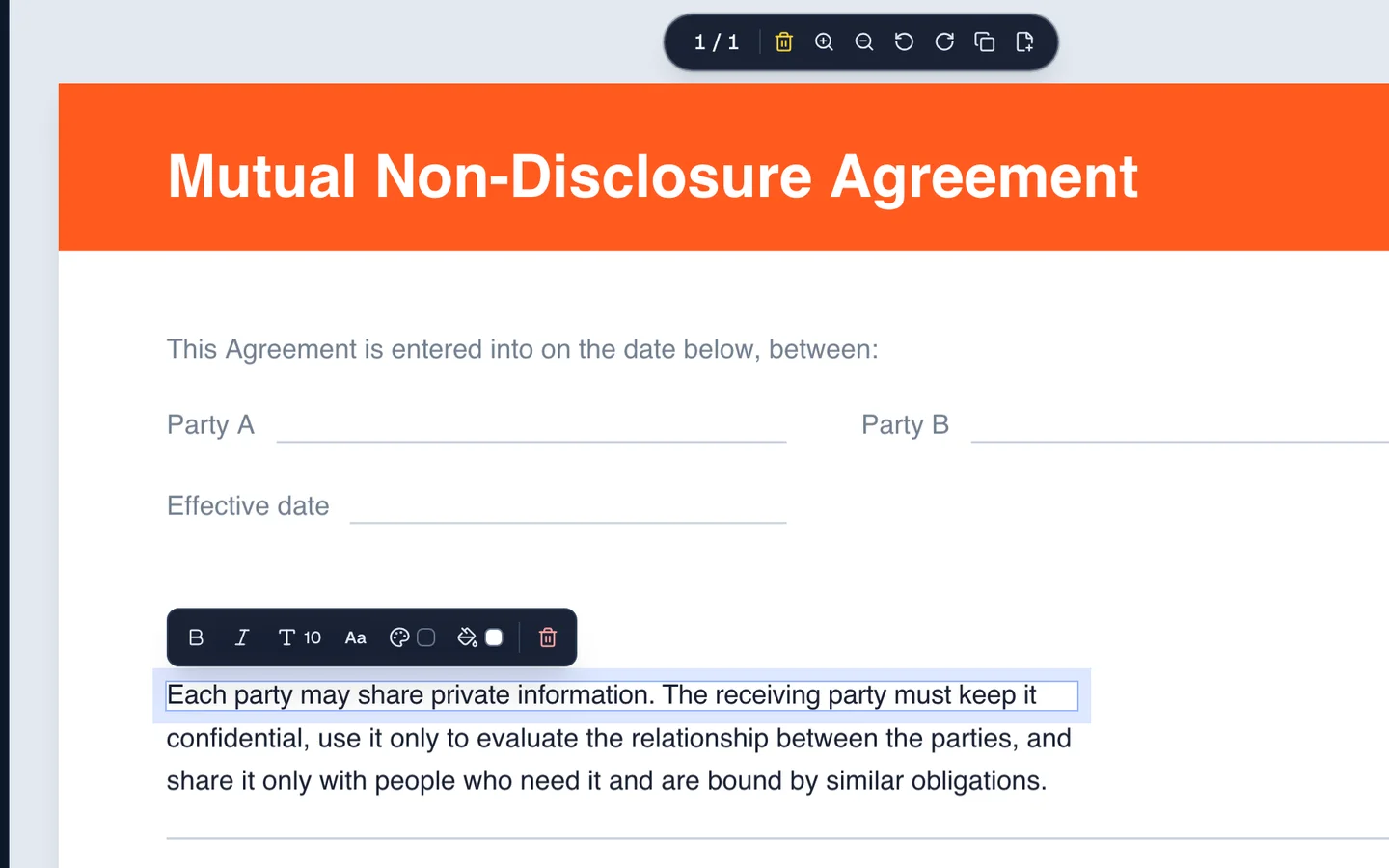
- Click the line you want to change. A thin frame and a small text bar appear around it.
- Type over the line. The editor reuses the document's own font and text color, so the fixed line matches the lines around it.
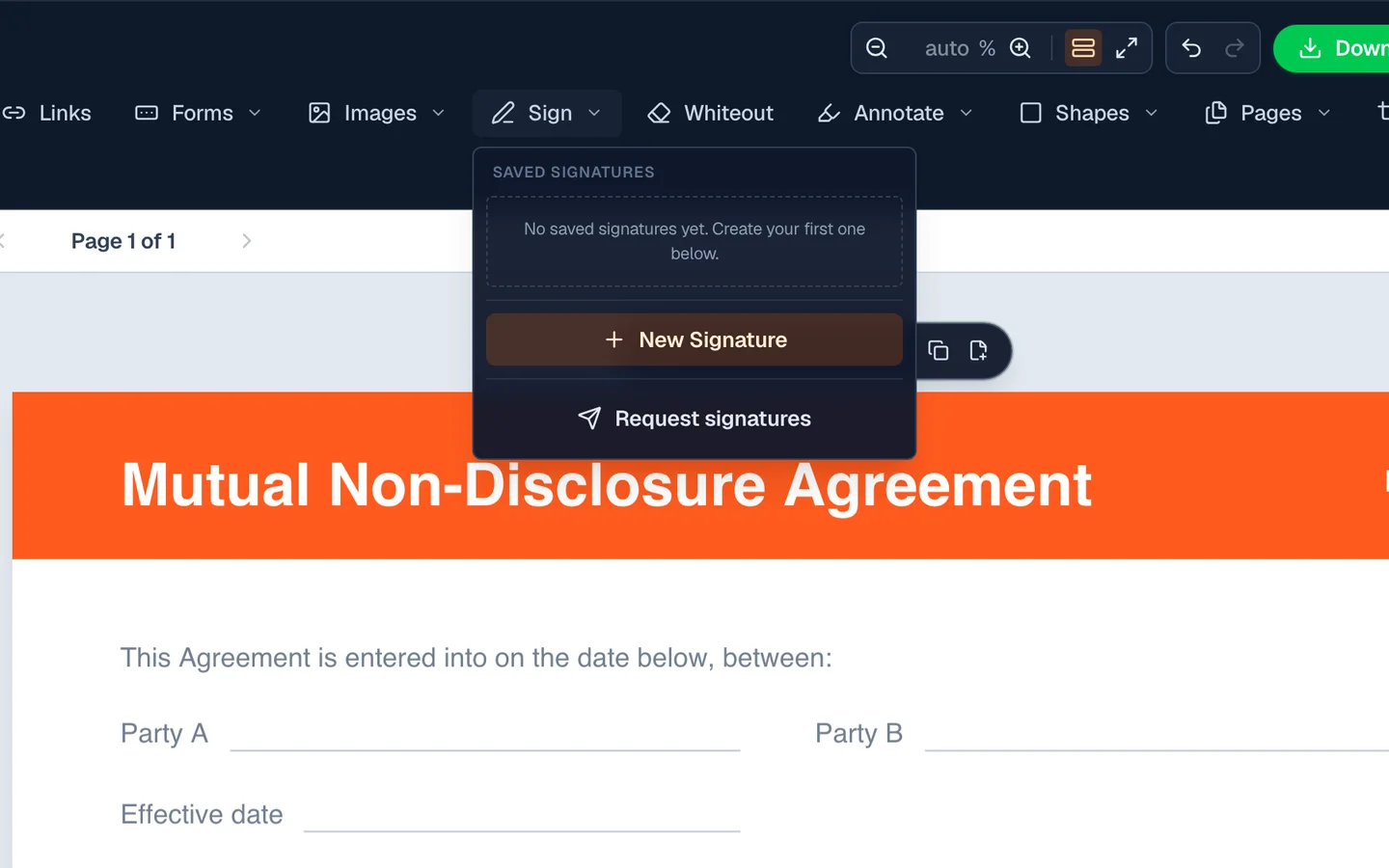
- Use the top bar for the rest: Text adds a new box, Sign places a signature, Whiteout covers something, Annotate highlights, and Pages rotates, duplicates, deletes or inserts a page.
- Click Download. The finished PDF lands in your Downloads folder with no watermark.
Where it stops: the free plan is 10 finished files a day and 50 MB per file. A scanned page is a picture, so its text cannot be clicked until it is read with OCR, and doing that inside the editor is a Pro feature ($3.99 a month or $29.99 a year).
Open the free PDF editorPreview vs FileHook: what each one does
Both are free to start. The Preview column follows Apple's Preview User Guide. The FileHook column is what the editor does today.
- Change text already in the PDF
- Preview:
- No. Apple says Preview can't edit PDF text
- FileHook:
- Yes. Click the line and type
- Add new text on top
- Preview:
- Yes, with the Text tool
- FileHook:
- Yes, with the Text tool
- Sign
- Preview:
- Yes. Trackpad, camera, or iPhone
- FileHook:
- Yes. Draw, type, or upload
- Fill in a form
- Preview:
- Yes
- FileHook:
- Yes
- Highlight and add notes
- Preview:
- Yes
- FileHook:
- Yes
- Rotate, delete and add pages
- Preview:
- Yes, in the thumbnail sidebar
- FileHook:
- Yes, in the Pages menu
- Combine two PDFs
- Preview:
- Yes. Drag thumbnails between files
- FileHook:
- Yes, with the separate merge tool
- Works with no internet
- Preview:
- Yes
- FileHook:
- No. It is a web page
- Keeps your original untouched
- Preview:
- Only if you duplicate first. Changes save automatically
- FileHook:
- Yes. You download a new file
- Price
- Preview:
- Free, comes with macOS
- FileHook:
- Free for 10 files a day. Pro is $3.99 a month
| Job | Preview | FileHook |
|---|---|---|
| Change text already in the PDF | No. Apple says Preview can't edit PDF text | Yes. Click the line and type |
| Add new text on top | Yes, with the Text tool | Yes, with the Text tool |
| Sign | Yes. Trackpad, camera, or iPhone | Yes. Draw, type, or upload |
| Fill in a form | Yes | Yes |
| Highlight and add notes | Yes | Yes |
| Rotate, delete and add pages | Yes, in the thumbnail sidebar | Yes, in the Pages menu |
| Combine two PDFs | Yes. Drag thumbnails between files | Yes, with the separate merge tool |
| Works with no internet | Yes | No. It is a web page |
| Keeps your original untouched | Only if you duplicate first. Changes save automatically | Yes. You download a new file |
| Price | Free, comes with macOS | Free for 10 files a day. Pro is $3.99 a month |
If all you need is a signature or a highlight, Preview is the quicker choice and you do not need us. Come here when the text itself is wrong.
What Preview does well, and the one thing it will not do
Preview is already on your Mac and it is better than its reputation. It highlights, underlines, adds notes and shapes, holds a signature you drew on the trackpad, rotates pages, deletes pages, and lets you drag a page thumbnail out of one PDF and into another to combine two documents. For marking up a draft it is genuinely enough.
What it will not do is let you click a line of body text and retype it. Preview's text tool drops a brand new box on top of the page. So the wrong figure stays where it was, with your correction floating beside it in a different font. That gap is why people search for this in the first place.
Preview writes over the file you opened
Worth knowing before you start marking anything up. Preview has no Save step in the way most apps do: it saves changes back into the original file as you go. If you highlighted half a contract and that was your only copy, that copy now has highlights in it. Use File then Duplicate first, or work on a copy in a different folder. Version history under File then Revert To can usually rescue you, but only on the same Mac.
Quick Look and Markup are the same limit in a smaller window
Select a PDF in Finder and press the space bar. Quick Look shows the document, and the Markup button in the top right gives you the same pens, shapes and signature. Handy for signing something in five seconds without opening an app. Still no way to change a word that is already printed on the page.
Print to PDF makes PDFs, it does not edit them
Every Mac app has this: Command P, then the PDF menu at the bottom left of the print sheet, then Save as PDF. It is the quickest way to turn a Pages document, a web page or an email into a PDF.
It is not an editing route. Sending an existing PDF through it produces a second copy of the same pages. The sentence you wanted to fix comes out word for word identical, and form fields and clickable links are lost on the way through.
Finder has a related trick that is genuinely useful: select a stack of images, right click, Quick Actions, Create PDF. It builds a PDF out of them in place. Again, a creator rather than an editor.
How to edit the actual text, in the browser
Open FileHook in Safari or Chrome, drop the PDF onto the card, and click the line you want to change. Type. The editor reads the document's own text and rewrites it, so the finished file is still searchable and still copies out as text.
The fonts embedded in your file are pulled out and reused, and the text color is sampled off the page, so a fixed line sits next to its neighbours without looking patched. One honest catch: if you type a character the document's own font never carried, a curly apostrophe or an accented letter in a tightly subsetted template font, the editor swaps in the closest standard font for that line and tells you which page it happened on. Check that page before you send the file.
Safari and Chrome hand you the download differently
Safari asks for permission the first time a site wants to download something, so if nothing appears when you click Download, look for that prompt. The file then lands in the folder set under Safari Settings, General, File download location, which is the Downloads folder unless you changed it. Safari also has an Open safe files after downloading option, and when it is on your finished PDF pops open in Preview on its own, which people often read as a bug.
Chrome puts the file in the same Downloads folder and shows it in the download bubble at the top right. Arc, Brave and Firefox on macOS all behave like Chrome here. None of them changes what the editor does.
Apple silicon, Intel, and old machines
There is no build to pick. No M-series download, no Intel download, no Rosetta question, no minimum macOS in an installer. It is a web page. What does change between machines is speed, because your Mac does the rendering: a 200 page scan opens in a few seconds on an M-series MacBook and takes noticeably longer on a 2015 iMac.
What stays on your Mac
The PDF you pick is read straight into the browser tab off your disk. It is not uploaded, there is no account step, and closing the tab leaves nothing behind. The single exception is the Share button, which is a deliberate click: it sends the finished PDF to our server so someone else can open a link, and an anonymous share deletes itself after two hours. Everything else, including the download, is built on your own machine. Free use covers 10 finished files a day across every tool on the site, resetting at midnight UTC, with files up to 50 MB.
FAQ
How do I edit PDF text on a Mac without Acrobat?
Open FileHook in Safari or Chrome, drop the PDF in, click the line and retype it, then download. Preview and Acrobat both stay closed, and nothing installs to the Mac.
Why can't I edit text in Preview?
Preview was built as a viewer with markup on top. Its text tool creates a new box over the page rather than opening the text that is already there, so an existing line cannot be retyped. Highlighting, signing, rotating and reordering pages all work fine.
Does Preview change my original file?
It does. Preview saves edits back into the file you opened, without asking. Duplicate the document first if you want to keep a clean copy of the original.
Where does the edited PDF go after I download it?
Into your Downloads folder, or wherever your browser's download location points. Safari may open it in Preview straight away if Open safe files after downloading is switched on.
Can I edit a scanned PDF on a Mac?
Not by clicking it, because a scan is a picture and there are no characters underneath. The editor spots a scanned page and offers to read the text off it, which is a Pro feature. There is also a free tool that makes the whole scan searchable.
Is there a Mac app to install?
None. It runs in the browser, so there is no installer, no license file and no background updater. That also means it works on a locked-down work Mac where you cannot install software.
How do I combine two PDFs on a Mac?
Preview can do it: open both, show thumbnails, and drag pages from one window into the other. If you have more than a couple of files, the merge tool here takes up to 100 at once and lets you reorder them before combining.