How do I add page numbers to a PDF?
Your long report has no page numbers. Fix it in 3 steps.
Drop your PDF into the page numbers tool, pick where the number goes and how it looks, then press the save button.
A preview shows you what it will look like before you save.
Your boss says "see page 14." Your PDF says nothing at all, so everyone scrolls and sighs. A number in the corner of every page ends that, and you can preview it first.
3 steps and you are done
Pick the corner, the style and where counting starts
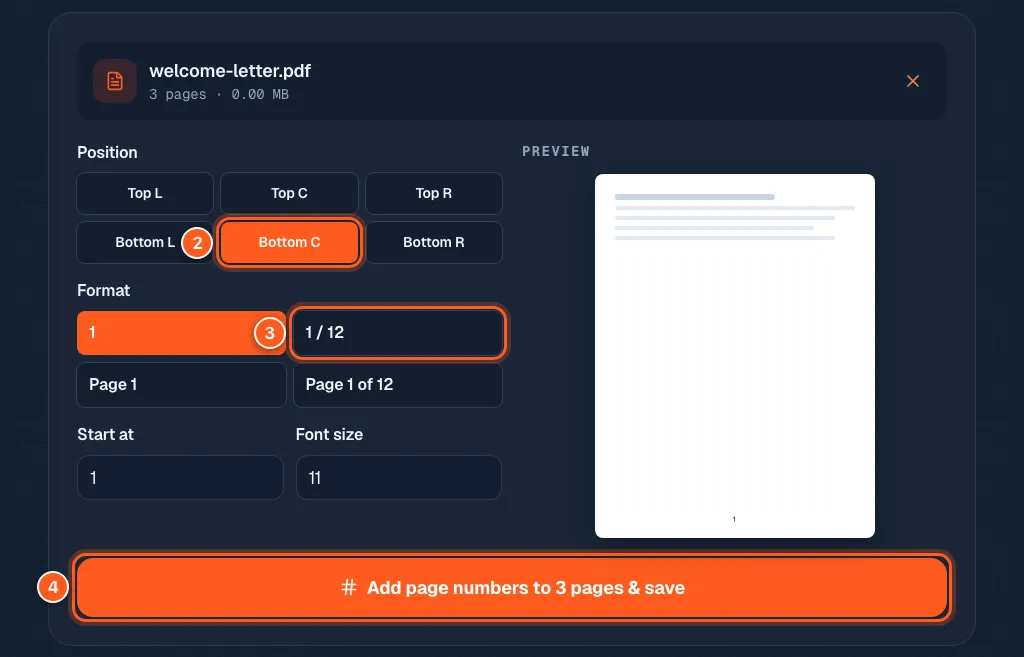
Position has six choices: top or bottom, and left, center or right. Bottom center is the usual one.
Format can be just the number (1), a number out of the total (1 / 12), or with the word Page (Page 1, Page 1 of 12).
You can also set the Start at number and the Font size. The preview on the right changes as you click.
Save it and stop saying 'scroll down a bit'
Press Add page numbers to ... pages & save. Your numbered PDF downloads. Open it and check a few pages.