How do I rearrange the pages in a PDF?
Do not rescan it. Rearrange the pages instead.
Open the Reorder PDF Pages tool, drop your file in, drag each page picture where you want it (or tap its arrows), then press Save.
Your pages are shown as pictures, so you can find the right one by looking.
The signed page ended up last. The cover letter came out in the middle, because the scanner took the pages in a funny order. You do not need to scan it again. Just move the pages.
3 steps and you are done
Add the jumbled PDF
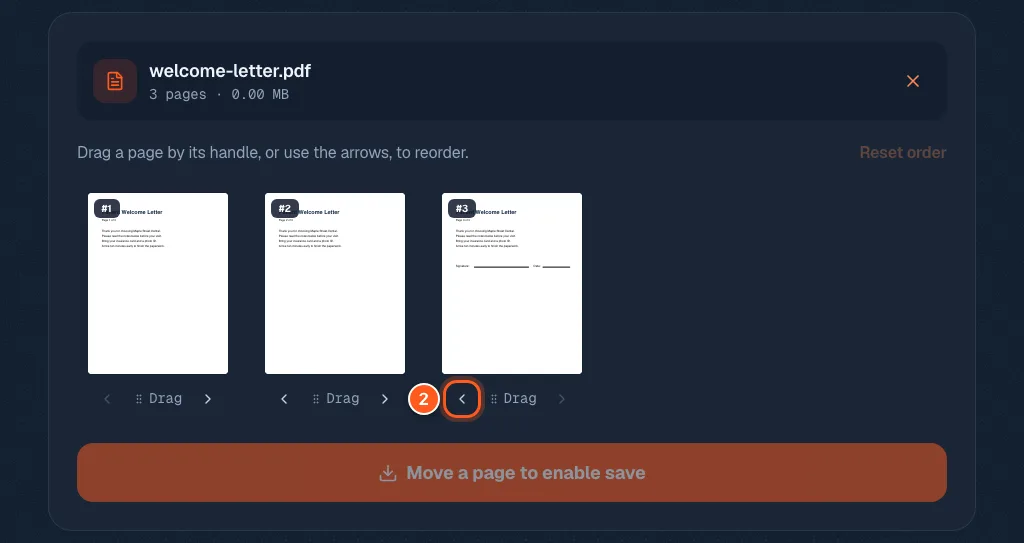
Go to the reorder tool and drop your file on the box, or click to browse. Every page shows up as a small picture.

Drag a page into place, or tap its arrows
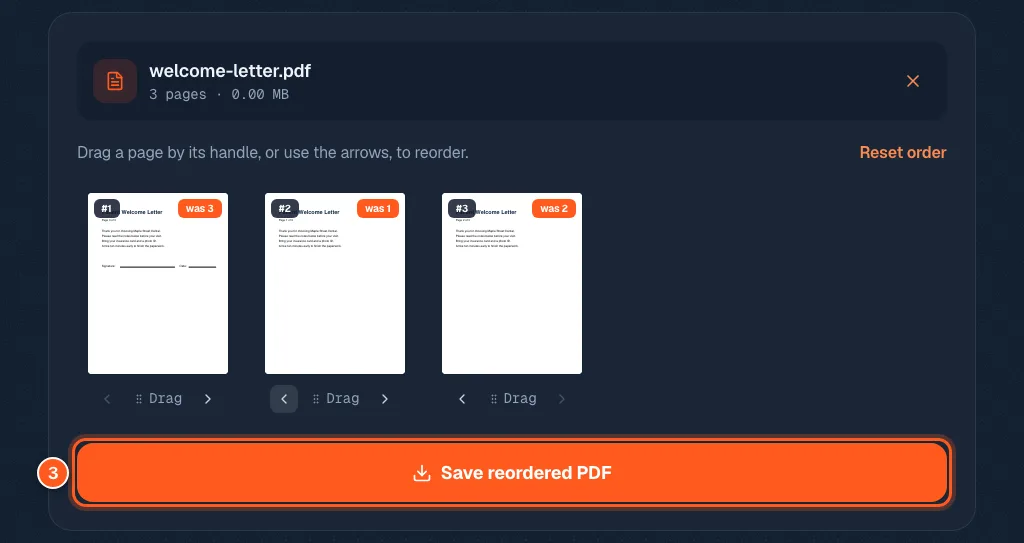
Under every page picture there is a left arrow, a Drag handle and a right arrow. Tap the left arrow to move that page one place earlier. Or grab the Drag handle and drop the page where you want it.
On a phone, press the Drag handle itself to drag. Pressing anywhere else just scrolls.
Look it over, then save the new order
The big badge on each page shows its new place. A second small tag says where it came from, like was 3, so nothing gets lost. Happy? Press the save button at the bottom. If it is greyed out, no page has moved yet.