
How do I delete a page from a PDF?
One wrong page can ruin a good PDF. Delete it in 3 steps.
Drop your PDF into the delete pages tool. Click each page you want gone, then press the save button.
You download a new PDF without those pages. Your original is not changed.
A blank page at the end. A cover sheet you never meant to send. One page with a phone number on it that nobody should see. Pull it out before the file goes anywhere.
3 steps and you are done
Drop your PDF in and see every page
Open the delete pages tool. Drop your file in the box, or click it to pick the file.
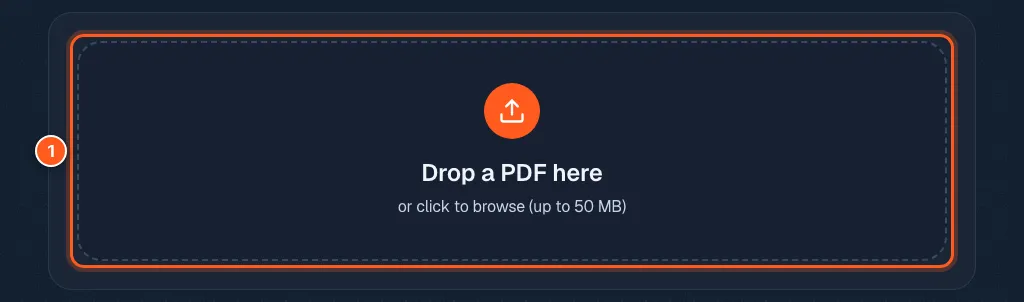
Click the pages you never want anyone to see
Every page shows up as a small picture. Click a page to mark it. A bin icon shows on the pages that will go. The counter says how many are marked.
Picked too many? Press Clear and start again. Select all marks everything.
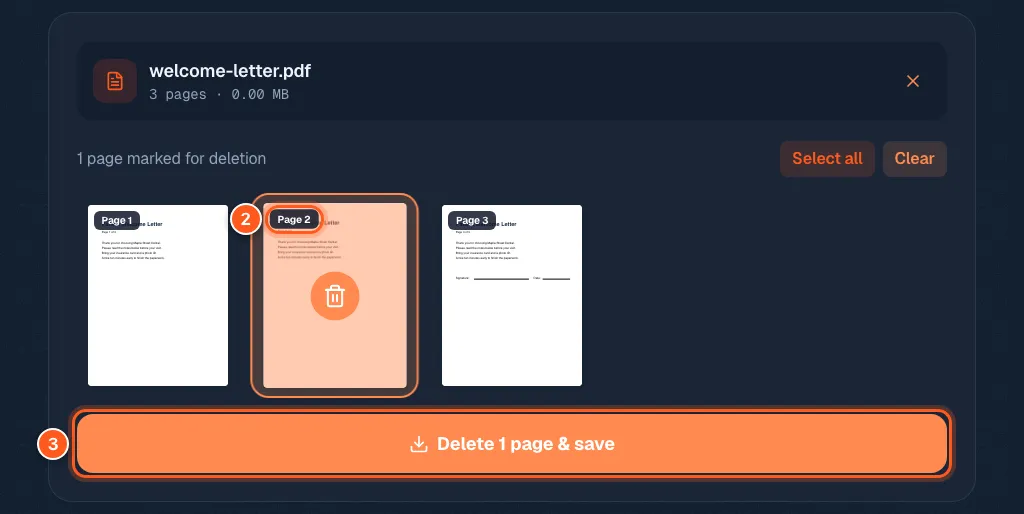
Save a clean copy (your original stays safe)
Press Delete 1 page & save (the number changes with how many you picked). Your trimmed PDF downloads. Flip through it once to make sure the right pages went.