
How do I put a password on a PDF?
One forward and strangers can read your ID scan. Lock the PDF first.
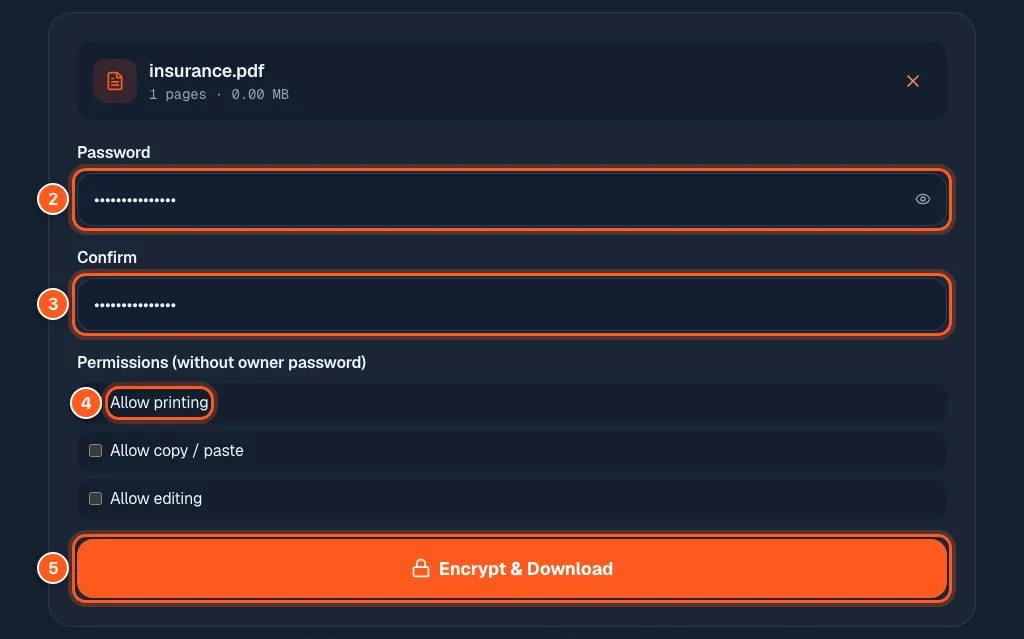
Drop your PDF into the protect tool, type a password twice, and press Encrypt & Download.
Anyone who opens the new file will be asked for that password first. The password never leaves your device.
Bank papers. A scan of your ID. A contract with your signature on it. Once that PDF is in an inbox, anyone who finds it can open it. A password stops that, and it takes three steps.
3 steps and you are done
Drop in the file that should not be public
Open the protect PDF tool. Drop your file in the box, or click it and pick the file.

Pick a password and decide what readers can do
Type your password in the first box and again in the Confirm box. Pick something long that you will not forget.
Under Permissions you can allow or block printing, copying text and editing.
Then press Encrypt & Download.
Prove it works before you trust it
Open the new file. It should ask for the password. Type it in and check the file looks right. Then send it, and share the password in a different way, like a text message.